


























How to Add Separators in Elementor?

Key Takeaways

  • Advanced Separators widget from The Plus Addons for Elementor allows users to add animated shape dividers to sections.
  • Users can choose from three shape divider types: None, Wave, and Shape 1.
  • The widget enables the addition of horizontal shape dividers to sections and vertical shape dividers to columns.
Table Of Content

Do you want to add unique separators to Elementor sections? Adding a unique shape divider to sections can add depth and creativity to your design.

With the Advanced Separators widget from The Plus Addons for Elementor, you can add a unique shape divider to the Elementor section.

Check the Live Widget Demo

Required Setup

Learn via Video Tutorial:

YouTube video

How to Activate the Advanced Separators Widget?

Go to 

  • The Plus Addons Widgets 
  • Search the widget name and turn on the toggle.
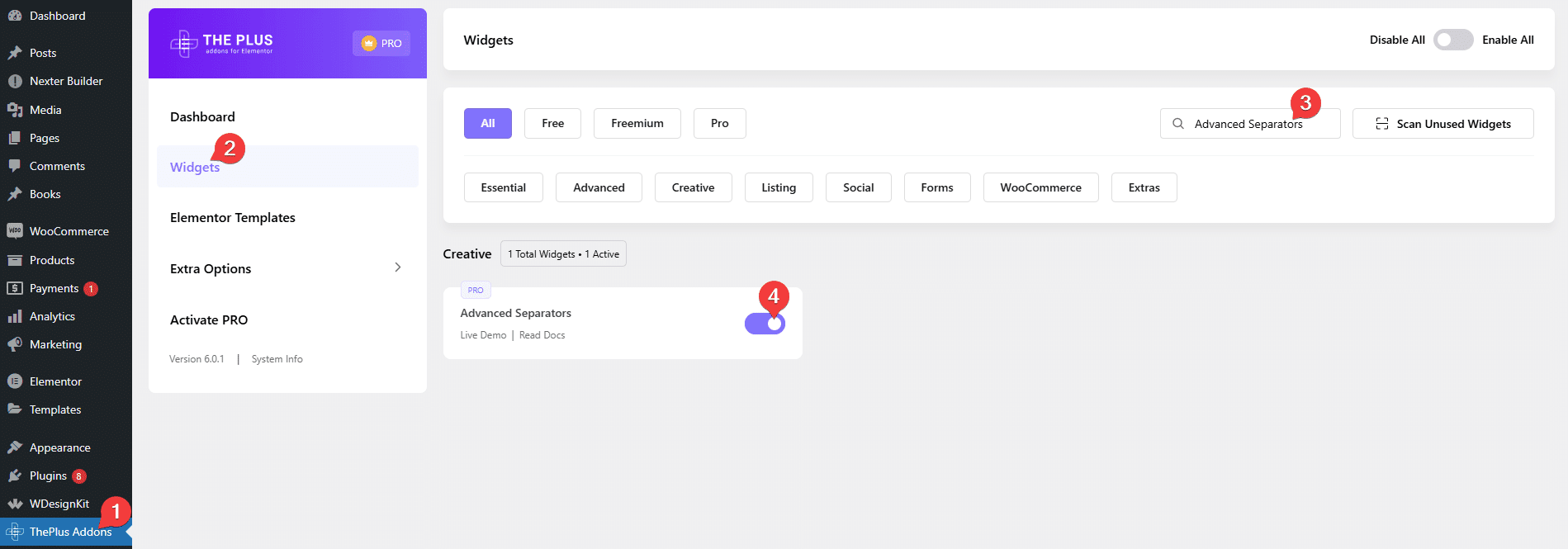
Advanced separators how to add separators in elementor? From the plus addons for elementor

Key Features

How to Use the Advanced Separators in Elementor?

Add the Advanced Separators widget to a container or section. 

From the Shape Divider section, you can select a shape divider type. Here you’ll find three options – 

  • None – With this option, no shape divider will be added.
  • Wave – With this option, you can add an animated shape divider.
  • Shape 1 – With this option, you can use a shape as a divider.

You’ll see different options based on your selection, let’s select Wave here.
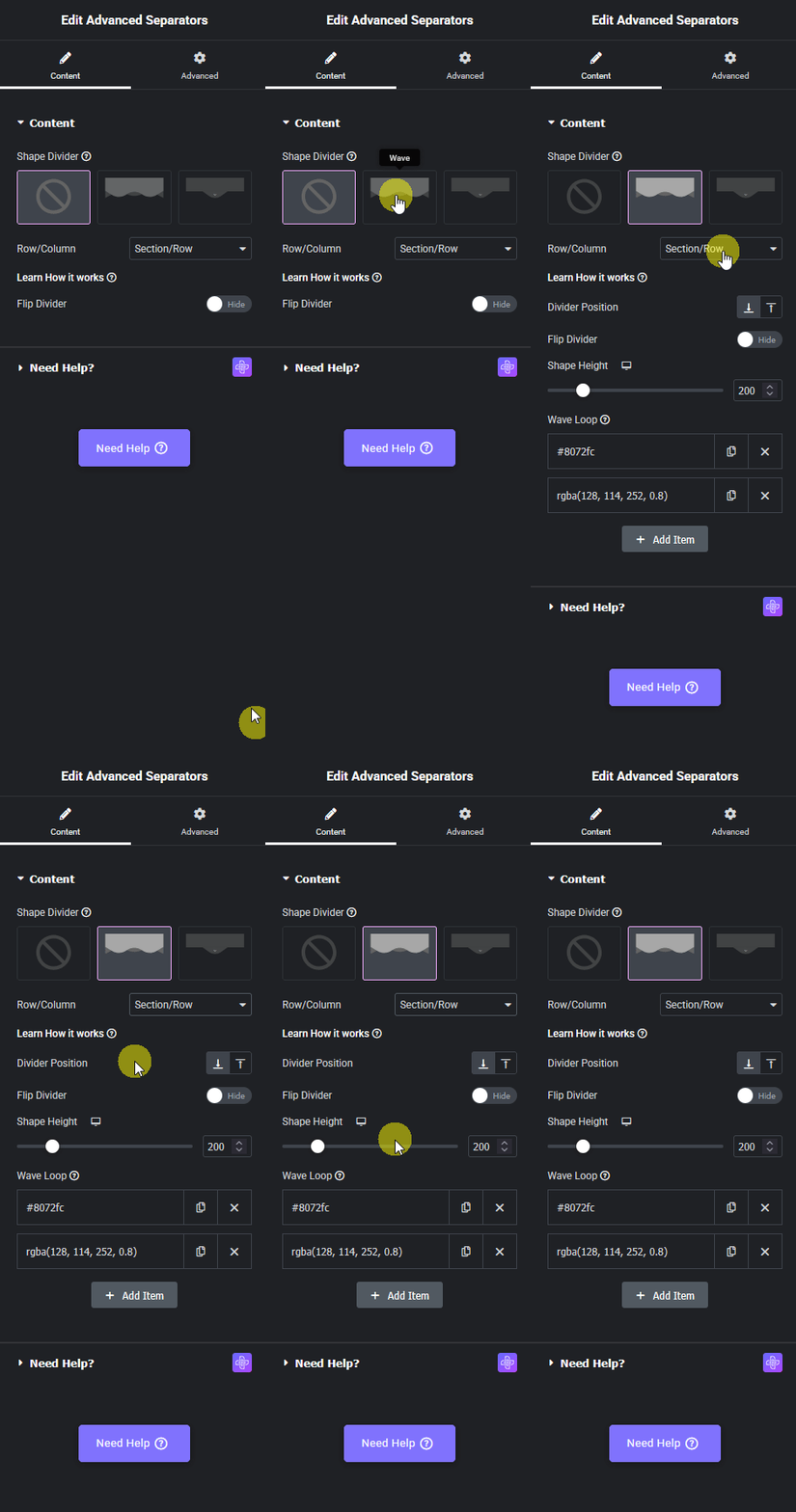
Advanced separators section row new how to add separators in elementor? From the plus addons for elementor

Then, from the Row/Column dropdown, you can select where to add the shape divider. Here you’ll find two options – 

  • Section/Row – With this option, you can add a horizontal shape divider to a section.
  • Column – With this option, you can add a vertical shape divider to a column.

Let’s select Section/Row here.

From the Divider Position, you can add the shape divider at the top or bottom of the section.

By enabling the Flip Divider toggle you can easily flip the shape divider.

You can set a height to the shape divider from the Shape Height section.

Then, from the Wave Loop section, you can add multiple animated wave shapes.

Advanced options remain common for all our widgets, you can explore all it options from here.

View Advanced Tab Tutorial

Get Instant Answers to all your questions about The Plus Addons for Elementor, trained on 1000+ Docs and Videos

Related Frequently Asked Questions

What should I do if the Advanced Separators widget isn't showing up?

If the Advanced Separators widget isn't visible, ensure that you have both the Elementor FREE Plugin and The Plus Addons for Elementor installed and activated. Additionally, check that the PRO version of The Plus Addons for Elementor is activated, as this widget is part of the premium offerings. You can verify this by navigating to The Plus Addons u2192 Widgets and searching for the Advanced Separators widget.

Can I use the Advanced Separators widget for animated dividers?

The Advanced Separators widget from The Plus Addons for Elementor allows you to add animated shape dividers, enhancing the visual appeal of your sections. You can select the 'Wave' option to create an animated divider, which adds a dynamic element to your design. This feature is particularly useful for creating engaging transitions between different sections of your webpage.

What are the best practices for positioning shape dividers?

When using the Advanced Separators widget, you can position shape dividers either at the top or bottom of a section. It's best to consider the flow of your content; for example, placing a horizontal shape divider at the bottom can visually separate two content areas, enhancing readability. Additionally, enabling the Flip Divider toggle can create a unique visual effect, so experiment with this to find the best fit for your design.

Does the Advanced Separators widget work with other page builders?

The Advanced Separators widget is specifically designed to work with Elementor, as part of The Plus Addons for Elementor. It does not support other page builders like Gutenberg, Beaver Builder, or Divi. This means if you're using Elementor, you can leverage this widget for unique design elements, but it won't function in other environments.

What happens if I don't activate the Advanced Separators widget?

If you do not activate the Advanced Separators widget, you won't be able to use its features to add shape dividers to your sections in Elementor. Activating the widget is essential to access options like animated dividers and various shape types. To activate it, go to The Plus Addons u2192 Widgets, search for 'Advanced Separators,' and toggle it on.

Are there different types of shape dividers I can add?

Yes, with the Advanced Separators widget, you can choose from several types of shape dividers. You can select 'None' for no divider, 'Wave' for an animated option, or 'Shape 1' for a static shape divider. Each option provides different visual effects, allowing you to customize the appearance of your sections based on your design needs.

Last reviewed: April 9, 2026
