


































Do you want to show a different text on hover on an Elementor button? Changing the button text on hover adds a dynamic and interactive element to your website. This effective technique can make a significant impact on the overall user experience.
With the Button widget from The Plus Addons for Elementor, you can easily show a different button text on hover in Elementor.
To check the complete feature overview documentation of The Plus Addons for Elementor Button widget, click here.
Requirement – This widget is a part of The Plus Addons for Elementor, make sure it’s installed & activated to enjoy all its powers.
To do this, add the Button widget to the page and follow the steps –
1. Select the appropriate style from the Button Style dropdown under the Layout tab.
Note: Only with Style 4, Style 11 and Style 14 you can change text on hover.
2. From the Alignment section, you can align the button for the responsive device.
3. In the Text field, add the normal button text.
4. Then, in the Hover Text field, you have to add the text that you want to show on hover.
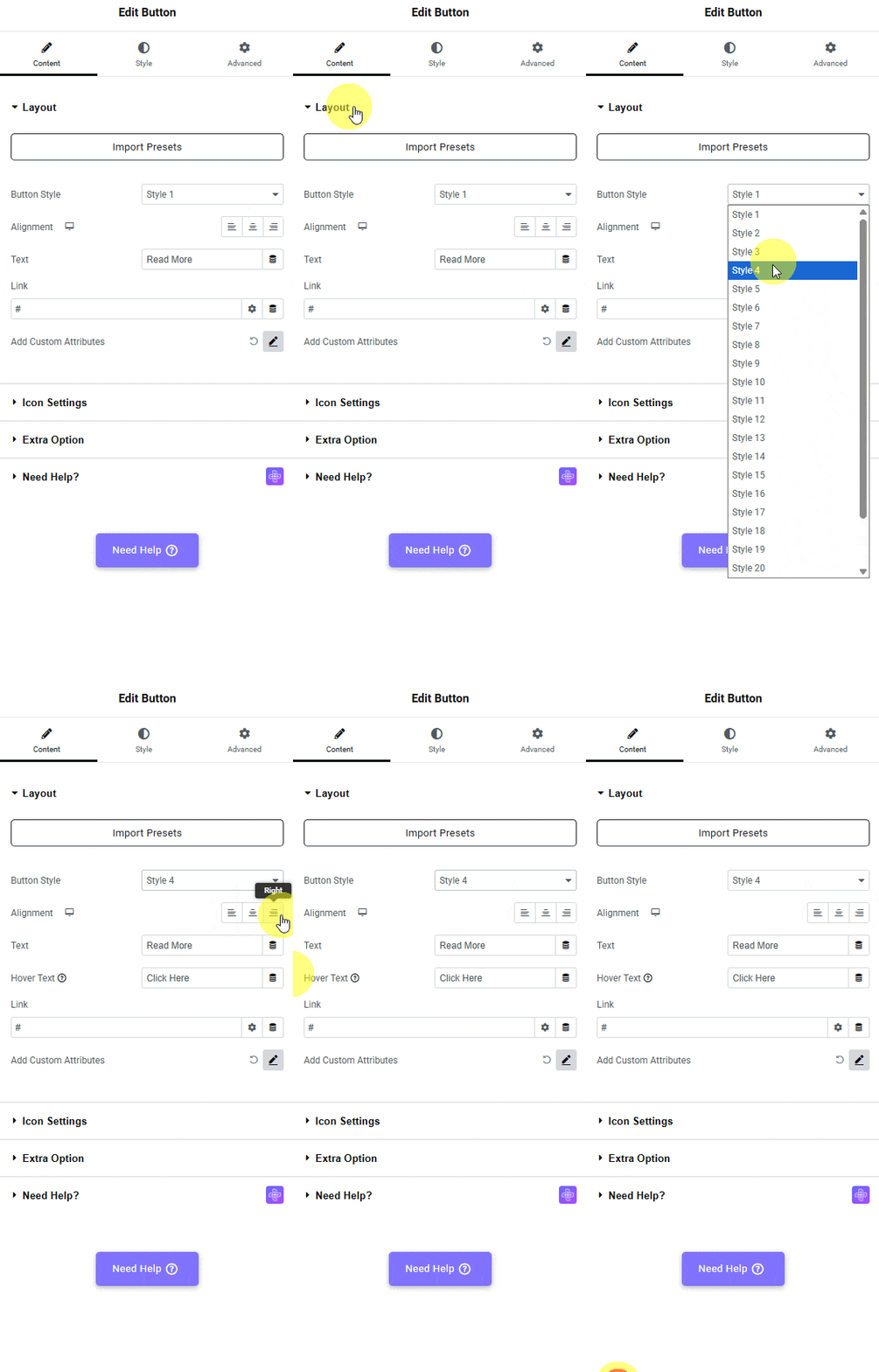
This is how easily you can change the button text on hover in Elementor for free.
Also, check out how to expand or close all accordion items with a button in Elementor.

Learn how to change text shadow on hover for an extra touch!

