

























How to Create a Full-Width Button in Elementor?

Key Takeaways

  • The Plus Addons for Elementor Button widget allows users to create a full-width button in Elementor.
  • Users can activate the Full-Width Button toggle in the Style > Special tab to make the button full width.
  • The Button widget requires The Plus Addons for Elementor to be installed and activated.
Table Of Content

Do you want to make a full-width button in Elementor? A full width button is a button that spans the entire width of a container, making it stand out and easily clickable for users. 

With the Button widget from The Plus Addons for Elementor, you can easily make a button full width in Elementor.

To check the complete feature overview documentation of The Plus Addons for Elementor Button widget, click here.

Requirement  – This widget is a part of The Plus Addons for Elementor, make sure it’s installed & activated to enjoy all its powers.

To do this, add the Button widget to the page and follow the steps – 

1. Select the appropriate button style and add the text to the button.

2. Then go to Style > Special tab and turn on the Full-Width Button toggle.
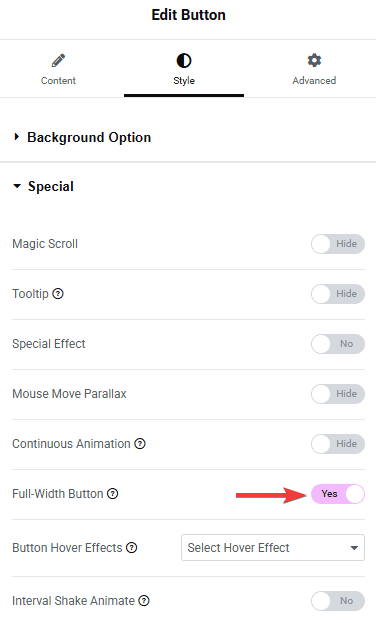
Tpae button style full width button how to create a full-width button in elementor? From the plus addons for elementor

Now your button will be full width.

Button full width demo how to create a full-width button in elementor? From the plus addons for elementor
Get Instant Answers to all your questions about The Plus Addons for Elementor, trained on 1000+ Docs and Videos

Related Frequently Asked Questions

What should I do if the full-width button toggle isn't working?

If the full-width button toggle isn't activating, ensure that you have The Plus Addons for Elementor installed and activated. This widget is part of the add-ons, and without it, the full-width feature won't be available. Double-check your installation and try again.

Can I use a full-width button for a call-to-action on my landing page?

A full-width button is ideal for call-to-action elements on landing pages as it stands out and is easily clickable. This design draws user attention, encouraging them to engage with your content. Using The Plus Addons for Elementor, you can customize the button style to match your branding.

What happens if I forget to turn on the Full-Width Button toggle?

If you forget to enable the Full-Width Button toggle, your button will remain at its default width, which may not be as visually impactful. To ensure it spans the entire width of the container, remember to activate this setting in the Style > Special tab.

Last reviewed: April 10, 2026

