Need help? Reach us at 

 +1 (855) 418-2323
Need help? Reach us at
+1 (855) 418-2323

To explain this feature specifically to those who might not find it very obvious at first, we've provided step-by-step instructions on how to print a directory tree. When you read it, you will see how easy it really is.
First, you select a directory you would like to print. If you wish to print the root directory of a logical drive, select that drive in the directory tree displayed on the left panel of Print Maestro.
Second, choose the way you want to print or export your directory. Options available are:
Sample directory printing lists:
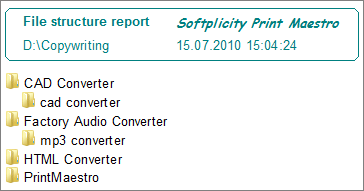


You can also use the "Custom report" feature to set up the way you want Print Maestro to print your directory tree.
Do you wish to print the whole tree or the top level only? If it is the tree, how many levels down do you want to go? What columns should the file list display? These could include file name, extension, modified date and many more. Prnt Maestro can print out even such exotic things as mp3 tags and EXIF info together with the list of your files if you so choose.
Download now full optional version of Print Maestro to make sure it is the best directory print software. Evaluation period is 30 days.
Windows XP/2003/Vista/7/8/10/11
"We print directory trees before server migrations to document the file structure. Print Maestro exports to Excel for comparison before and after. Handles drives with 500,000+ files without issues."
 Thomas Richter IT Manager, Siemens AG
"Compliance audits require printed directory listings with dates and file sizes. Print Maestro produces formatted PDF reports that satisfy our auditors. Much better than command-line output."
Karen Wright Records Manager, US Army Corps of Engineers
"We generate directory trees for our backup verification process. Print Maestro exports to CSV for automated comparison with our backup logs. Very reliable."
 Kenji Yoshida Systems Administrator, NTT Data Japan
Download free trial and convert your files in minutes.
No credit card or email required.


 Forensic
